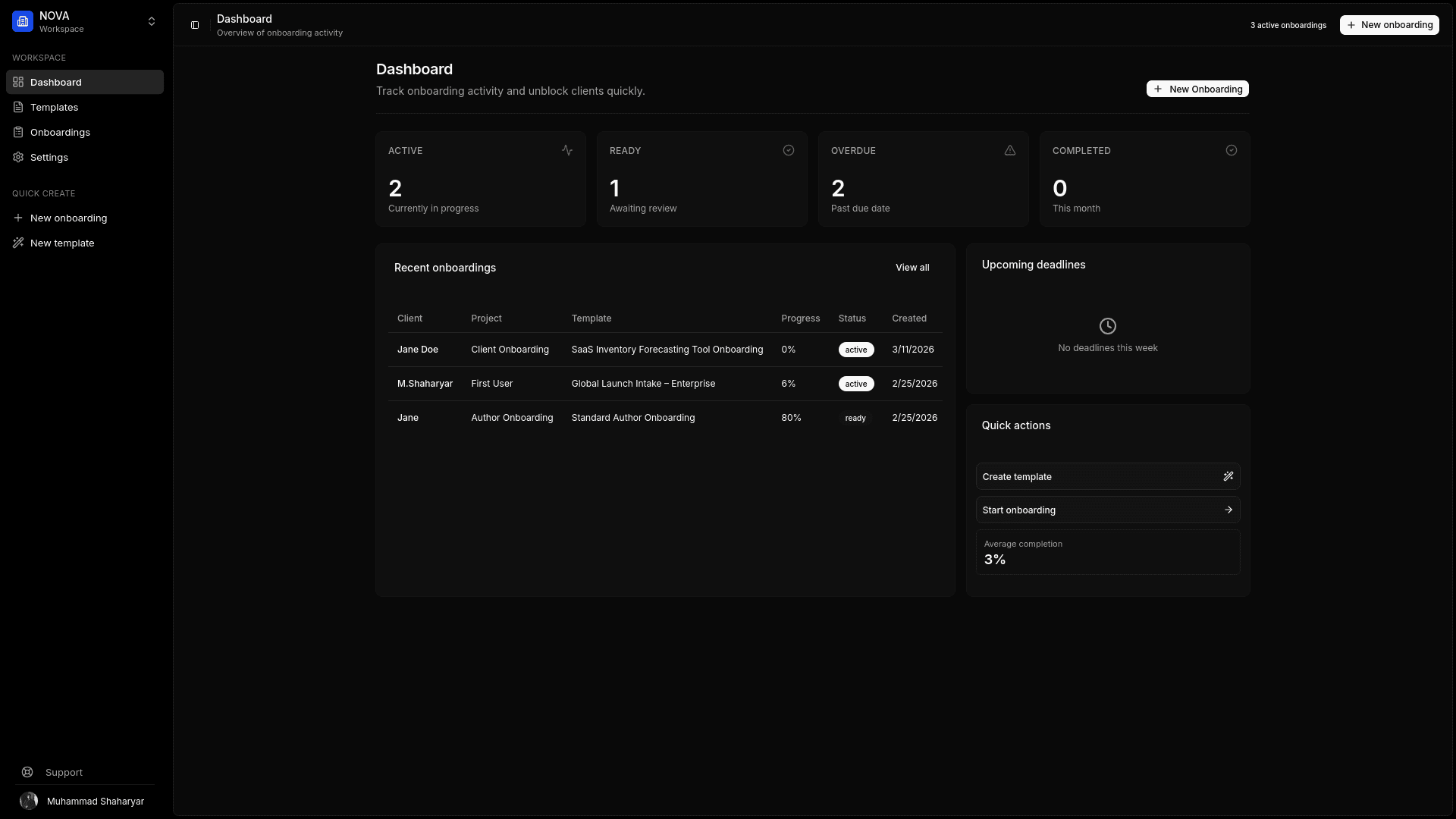
Client Asset Collection Software for Agencies
Kicklayer is client asset collection software for agencies that need to request project files, written content, URLs, and credentials from clients before work can begin.
This is not software for tracking office equipment, inventory, or fixed assets. It is a structured client asset portal for collecting the inputs that creative, marketing, web, and software projects depend on: vector logos, brand guidelines, copy, images, documents, technical details, and access credentials.
Instead of telling a client to “upload everything to Drive,” your team defines exactly what belongs in each slot. The client receives one secure magic link, sees what is required, uploads the correct files, and returns later if needed. Kicklayer tracks progress, sends reminders, and packages the completed submission into one ZIP.
Start collecting client assets — no credit card required.
On this page
- What is client asset collection software?
- Client asset collection is not digital asset management
- Why shared folders fail
- How Kicklayer collects client assets
- Client asset collection checklists
- How to create an asset request workflow
- Frequently asked questions
What is client asset collection software?
Client asset collection software helps a service business request, receive, validate, and organize the materials a client must submit for a project.
For an agency, those assets often include:
- Logos and brand guidelines
- Product images and team headshots
- Website copy and marketing content
- Documents and spreadsheets
- Existing design files
- Reference links
- CMS, hosting, and analytics access
- Campaign platform credentials
- Technical documentation
- Approval notes and stakeholder details
The important difference is structure. A shared folder gives the client somewhere to place files. An asset collection workflow tells the client what to provide, which format is acceptable, what is missing, and whether a submission needs to be replaced.
Client asset collection is not digital asset management
“Asset software” can describe several different product categories. They solve different problems.
| Tool type | Primary purpose | Typical use |
|---|---|---|
| Client asset collection software | Gather missing project inputs from a client | Request a vector logo, copy, credentials, and images before a website build |
| Digital asset management software | Store, organize, and distribute approved creative assets | Maintain a long-term searchable library of brand files |
| Physical asset management software | Track equipment, inventory, or fixed assets | Record laptops, machinery, tools, or vehicles |
| Cloud storage | Store files in folders | Share a Drive, Dropbox, or OneDrive directory |
| Generic form builder | Collect text answers and basic uploads | Send an intake questionnaire |
Kicklayer is designed for the first category. It handles the intake stage: requesting the correct assets, tracking missing items, and producing an organized handoff.
For the broader agency workflow, see client onboarding software for agencies.
Why shared folders fail for client asset collection
Shared folders are useful storage tools. They are weak request tools.
A folder does not tell the client that the logo must be an SVG or AI file. It does not explain that the homepage banner needs a minimum resolution. It does not remind the client that the “About” page copy is still missing. It does not separate approved assets from incomplete submissions. It does not make password collection appropriate.
The result is familiar:
- A low-resolution logo is uploaded with no vector version.
- Final copy arrives in multiple documents with conflicting edits.
- Product photos are mixed with screenshots and compressed WhatsApp images.
- The project manager asks for the same missing files several times.
- Credentials are pasted into an email thread.
- The agency starts work early, then loses momentum waiting for dependencies.
The real cost is not the five minutes spent sending another reminder. It is the context switching, delayed kickoff, incomplete brief, and rework that follow.
How Kicklayer collects client assets
Create explicit asset slots
Build a reusable template with a clear place for every required input.
Instead of requesting “branding,” request:
- Primary logo — SVG or AI preferred
- Secondary logo variation
- Favicon
- Brand guidelines — PDF
- Font files or font URLs
- Brand color values
- Approved team headshots
- Product photography
- Existing website URL
Each item can include instructions, required status, and the expected submission type.
Collect files, text, URLs, and credentials
Not every project input is a file. Kicklayer templates can collect structured text answers, links, uploads, and sensitive access details.
That means the same onboarding portal can request:
- A logo file
- A product description
- A Google Analytics URL
- CMS login credentials
- A list of competitor websites
- A written approval note
Let clients upload without creating an account
Clients open a secure magic link, upload files, and complete sections at their own pace. Progress auto-saves, so a client can return later without starting again.
Detect weak submissions early
Kicklayer can analyze assets for issues such as resolution, format, and size. If a file is not usable, your team can reject it with a clear reason and trigger a follow-up.
That prevents a low-quality submission from quietly reaching the designer or developer who discovers the problem days later.
Track every active collection request
The agency dashboard shows project status and completion progress. Your team can see which clients are active, ready for review, complete, or overdue.
Export one organized ZIP
Once the client finishes, download a structured ZIP package instead of manually collecting attachments from email, chat, and multiple folder links.
Client asset collection checklists
A focused checklist is easier for the client to complete than a vague request for “all project assets.”
Website design and development asset checklist
| Category | Request |
|---|---|
| Branding | Vector logo, favicon, brand guidelines, colors, fonts |
| Content | Page copy, calls to action, contact details, legal text |
| Images | Product photos, team headshots, location photos, testimonials |
| Technical | Domain registrar, hosting, CMS access, analytics, integrations |
| References | Existing website, competitor sites, inspiration examples |
| Operations | Stakeholders, approval owner, timeline constraints |
Branding project | Stakeholders, approval owner, timeline constraints |
Branding project asset checklist
| Category | Request |
|---|---|
| Existing identity | Current logos, guidelines, packaging, templates |
| Company context | Story, positioning, audience, services, differentiators |
| References | Competitors, liked examples, disliked examples |
| Deliverables | Required formats, use cases, printing requirements |
| Approval | Decision-makers, review process, deadlines |
Marketing campaign asset checklist
| Category | Request |
|---|---|
| Brand assets | Logo, colors, fonts, approved imagery |
| Campaign | Offer, target audience, goals, channels, budget context |
| Access | Advertising accounts, analytics, landing page, email platform |
| Content | Existing ads, product copy, testimonials, case studies |
| Approval | Stakeholders, compliance constraints, turnaround time |
Software and product design asset checklist
| Category | Request |
|---|---|
| Product context | Product area, user type, business objective |
| Existing UI | Screenshots, design system, component library |
| Technical | Stack, platform constraints, responsive requirements |
| References | Competitor products, inspiration, known pain points |
| Access | Test account, staging URL, relevant documentation |
How to create an asset request workflow
1. Start with the deliverable
List every input required to complete the work without interruption. Work backwards from the deliverable instead of copying an oversized generic questionnaire.
2. Separate required and optional assets
A primary logo may be mandatory. Additional photography may be optional. The client should immediately understand which missing items block kickoff.
3. Specify formats and quality requirements
Do not ask for “a logo.” Ask for “a vector logo in SVG, AI, or EPS format.” Do not ask for “images.” State the preferred dimensions, orientation, or file type.
4. Give every request one owner
One stakeholder should be responsible for completing the portal, even if they gather materials from other people internally.
5. Review submissions before production begins
A file being uploaded does not mean it is usable. Check quality, completeness, and access details before the project enters delivery.
6. Reuse the workflow
Save the template for the next website, campaign, branding engagement, or consulting project. Reusable schemas make quality consistent as the agency grows.
For a lower-friction client experience, see client portal software for agencies.
Frequently asked questions
What is the fastest way to collect assets from a client?
Send one structured portal with named asset slots, required fields, format instructions, and a visible completion state. Avoid splitting the request across email, chat, forms, and shared folders.
What files should a web design agency request from a client?
At minimum, request a vector logo, brand guidelines, website copy, contact information, images, CMS access, hosting or domain details, analytics access, required integrations, stakeholder details, and reference websites.
What is the difference between client asset collection software and a DAM?
Client asset collection software gathers missing files and information from clients before or during a project. A digital asset management system stores, organizes, and distributes an established library of approved assets over time.
Can clients upload files without creating an account?
Yes. Kicklayer uses a secure magic link, allowing a client to upload files and complete their request without registering for another platform.
How can an agency stop receiving low-resolution logos?
Create a dedicated required field for the primary logo, state that vector formats such as SVG or AI are preferred, validate the upload, and reject unusable files with a clear replacement request.
Should clients send passwords through an asset upload form?
No. Sensitive credentials should not be placed in email, chat, or an ordinary text box. Kicklayer includes a secure credential vault designed for collecting access details separately.
Collect the right files before work begins
Stop searching email attachments and messy folders for project inputs. Create a reusable asset request template, send one secure portal, and download a clean final package.