Client Onboarding Software for Agencies
Kicklayer is client onboarding software for agencies that turns the messy period after a contract is signed into one structured workflow.
Instead of chasing logos through email, asking for missing copy in Slack, searching shared folders, and repeatedly reminding clients to answer basic project questions, your agency sends one secure onboarding link. The client uploads files, submits project details, and returns later without creating an account. Your team sees what is complete, what is missing, and what needs review.
Start your 7-day trial — no credit card required.
On this page
- What is client onboarding software for agencies?
- Why agency onboarding breaks down
- How Kicklayer works
- What to collect during client onboarding
- Which agencies benefit from onboarding software?
- How to evaluate agency onboarding software
- Frequently asked questions
What is client onboarding software for agencies?
Client onboarding software helps an agency collect everything required to begin a project: files, written answers, URLs, approvals, technical details, and credentials.
A good agency onboarding system does more than display a questionnaire. It creates a repeatable process:
- Your team defines exactly what the client must provide.
- The client receives one clear onboarding portal.
- The system tracks missing items and sends reminders.
- Your team reviews submissions before work begins.
- The final handoff is organized and ready to use.
Kicklayer is built around that workflow. It replaces scattered email threads, generic forms, and loosely organized Drive folders with reusable onboarding templates and a client-facing portal.
| Without structured onboarding | With Kicklayer |
|---|---|
| The logo arrives as a low-resolution JPEG | The request specifies the required file format |
| Copy is pasted across multiple email threads | Text answers are collected in defined fields |
| The project manager manually follows up | Automated reminders handle incomplete onboarding |
| The client forgets which items are missing | The portal shows progress and required fields |
| Files are scattered across tools | The completed onboarding is downloaded as one ZIP |
| Passwords are sent in plain text | Credentials can be collected through a secure vault |
Why agency onboarding breaks down
The first week of an agency project often looks productive from the outside. Internally, work is blocked.
The client says they already sent the logo. The designer receives a compressed image instead of a vector. Website copy is split between a Google Doc and a long email chain. Hosting credentials are posted in Slack. A stakeholder answers half of the questionnaire and forgets to return.
The problem is not usually unwillingness. The request itself is fragmented.
Forms can collect answers, but they often treat onboarding as a one-time submission. Shared folders store files, but they do not explain what is missing. Email is flexible, but it becomes difficult to audit. Internal project management tools are designed for your team, not for a client who wants to upload the correct files and move on.
A client onboarding portal should remove decisions from the client’s side. Each request should answer three questions:
- What exactly do you need?
- Which format should I send?
- What is still incomplete?
How Kicklayer works
1. Create a reusable onboarding template
Define the information your team needs before work starts. A Kicklayer template can request structured text, files, URLs, and credentials.
For a website redesign project, that might include:
- Primary logo in SVG, AI, or EPS format
- Brand guidelines
- Website URL
- Hosting and CMS access
- Existing analytics access
- Team headshots
- Product photography
- Page copy
- Competitor references
- Required integrations
- Technical constraints
- Approval stakeholders
For a branding engagement, the schema would be different. Your agency can reuse the appropriate template instead of rebuilding the request from scratch for every client.
2. Send a secure magic link
The client receives one portal link. They do not need to create an account or remember another password.
The portal is designed for completion: clear sections, required fields, drag-and-drop uploads, progress tracking, and auto-saving answers. Clients can return later and continue where they left off.
3. Let the workflow handle follow-ups
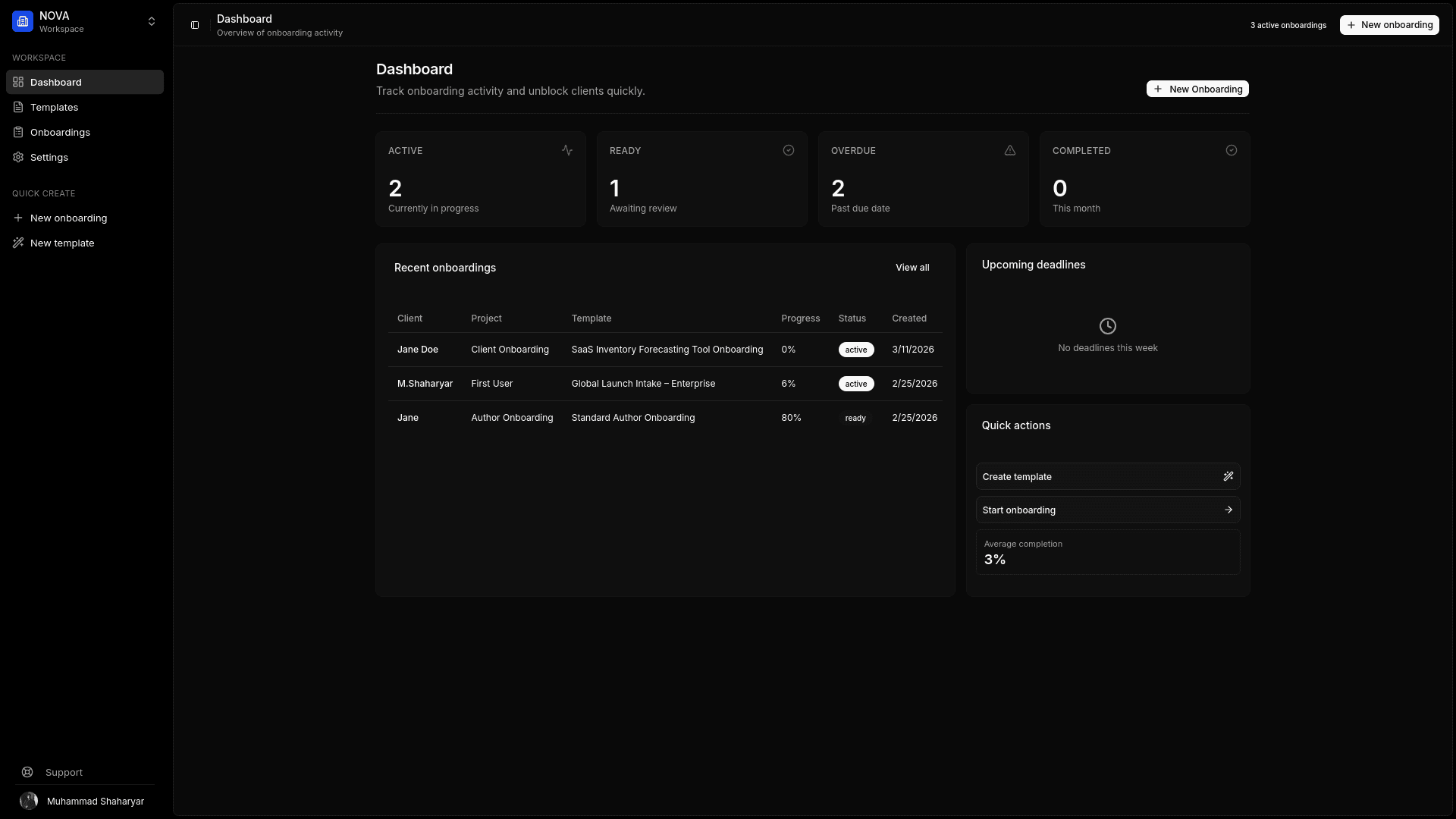
Kicklayer tracks incomplete onboarding and sends automated reminders. Your team can see the status of active projects from a dashboard instead of searching through email, Slack, and Drive.
That gives account managers a clear view of which clients are active, ready for review, completed, or overdue.
4. Review assets before kickoff
Files can be checked before they reach production. If a client submits a blurry logo, the asset can be rejected with a clear reason and an automated follow-up.
Kicklayer can also analyze uploaded files for issues such as resolution, file format, and file size, then generate a structured project brief from the submitted answers.
5. Download a clean handoff
Once onboarding is complete, your team downloads one organized ZIP package. The project starts with a usable brief and the files required to execute it.
What to collect during client onboarding
The correct onboarding checklist depends on the service. Avoid sending one oversized generic questionnaire to every client.
| Agency service | Important onboarding inputs |
|---|---|
| Website design and development | Logo files, brand guidelines, copy, CMS access, hosting details, analytics access, integrations, stakeholder list |
| Branding | Existing visual assets, company story, audience, competitors, references, deliverables, file requirements |
| Marketing | Brand assets, campaign goals, offers, channel access, analytics, audience details, approval process |
| Product design | User context, product area, technical constraints, design system assets, screenshots, references |
| Consulting | Business context, documents, goals, stakeholders, timelines, relevant systems, existing research |
| Content production | Brand voice, audience, existing copy, references, approval owners, publishing access |
The goal is not to ask more questions. The goal is to ask the smallest complete set of questions required to begin work without avoidable clarification loops.
For the file-specific workflow, see client asset collection software for agencies.
Which agencies benefit from onboarding software?
Kicklayer is useful when your agency repeatedly needs clients to submit structured information before work can proceed.
Web design and development agencies
Collect copy, logos, images, CMS credentials, hosting access, domain details, analytics access, and integration requirements before the build begins.
Branding and creative agencies
Request vector logos, existing guidelines, visual references, company positioning, audience details, and approval stakeholders through a repeatable brief.
Marketing agencies
Create onboarding schemas for paid ads, content retainers, SEO work, email campaigns, and social media management. Each service can request the relevant access, assets, and objectives.
Software and product consultancies
Collect project goals, constraints, documentation, technical context, product screenshots, existing design systems, and stakeholder details in one handoff.
Small agencies scaling beyond founder-led operations
A founder may remember what to ask each client. A growing team needs a reusable process. Templates make onboarding consistent without forcing every project manager to invent their own checklist.
How to evaluate agency onboarding software
When comparing client onboarding tools, ask whether the product improves the client experience and the internal handoff.
Look for:
- Reusable onboarding templates
- Required fields and explicit asset slots
- Support for files, written answers, URLs, and credentials
- Passwordless client access
- Auto-saving progress
- Automated reminders
- A dashboard for incomplete and completed onboarding
- Asset review and rejection workflows
- File validation
- Audit history
- A downloadable final package
- Agency branding options
Kicklayer focuses on the intake stage. It is not trying to become your CRM, accounting system, or internal project manager. It solves the specific operational problem that delays otherwise-ready agency projects: getting complete, usable inputs from the client.
For the client-facing experience, see client portal software for agencies.
Frequently asked questions
What is the best way to onboard a new agency client?
Start with a reusable checklist for the specific service you sold. Request every required file, answer, URL, approval owner, and credential through one client-facing portal. Set required fields, define acceptable formats, and track completion before scheduling kickoff.
How is client onboarding software different from a CRM?
A CRM tracks relationships, leads, sales activity, and account history. Client onboarding software manages the post-sale intake process: collecting project details, files, credentials, and approvals so delivery can begin.
How is onboarding software different from project management software?
Project management software organizes your team’s tasks after a project begins. Client onboarding software handles the inputs required before those tasks can move forward. The two systems can complement each other.
Do clients need to create an account to use Kicklayer?
No. Kicklayer uses secure magic-link access, allowing a client to open the onboarding portal without creating another account.
Can an agency collect credentials during onboarding?
Yes. Kicklayer includes a secure credential vault for sensitive access details. Avoid collecting passwords through email, chat, or ordinary text fields.
Can Kicklayer remind clients about missing information?
Yes. Kicklayer supports automated reminders for incomplete onboarding. The available reminder capabilities depend on the selected plan.
Stop chasing clients before the project even begins
Build one reusable onboarding template, send one secure link, and begin projects with the files and answers your team actually needs.