Client Portal for Agencies
Kicklayer is a client portal for agencies that gives each client one secure place to submit project details, files, approvals, and credentials.
Your client does not need to create an account, learn your internal project management tool, or search through an old email thread. They open a magic link, see exactly what your team needs, upload the requested assets, and track their completion progress.
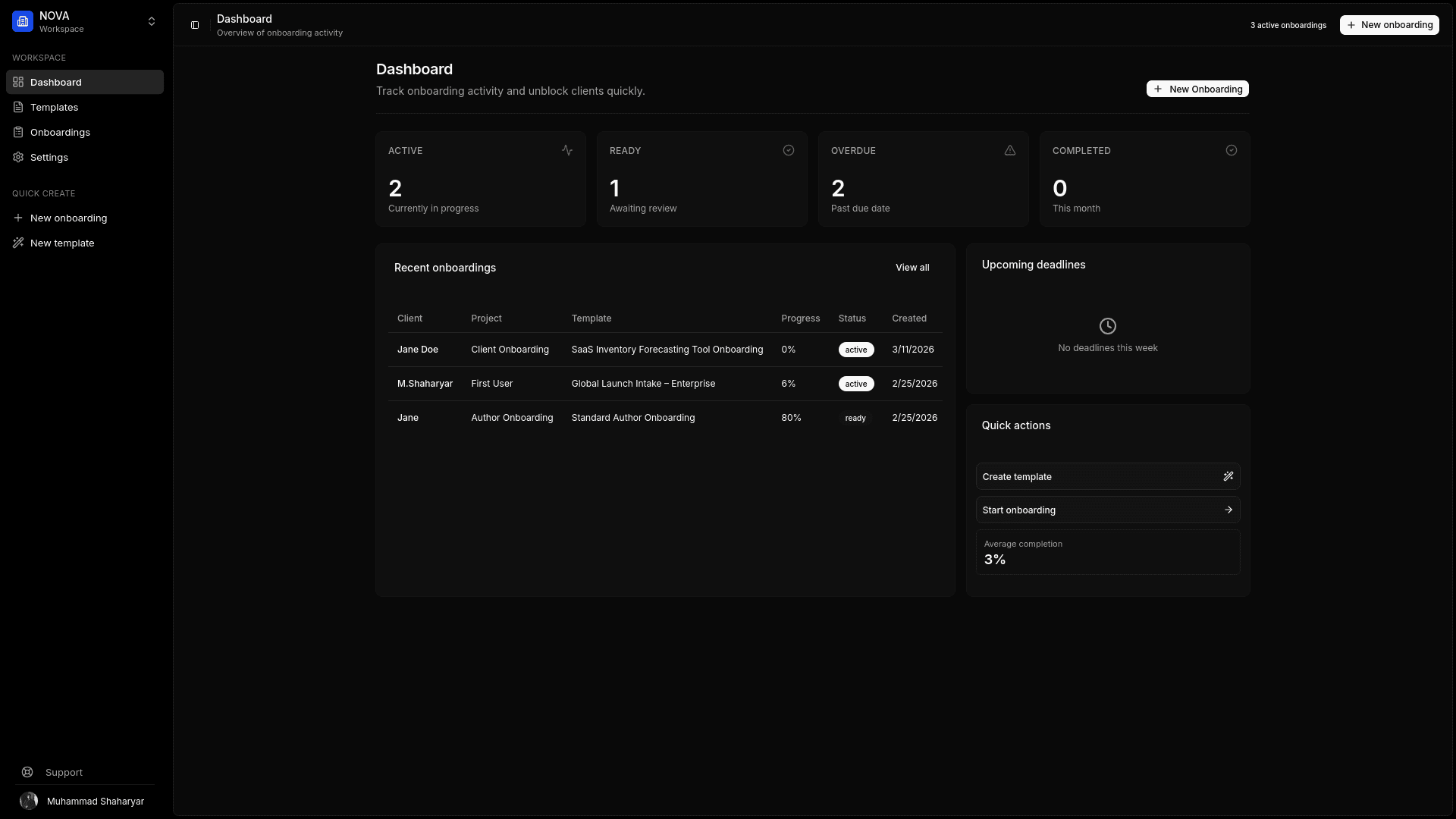
Your agency gets a dashboard, structured submissions, automated follow-ups, asset review tools, audit history, and an organized ZIP handoff.
Create your client portal — no credit card required.
On this page
- What is a client portal for agencies?
- Why agencies need a client-facing portal
- What clients see in Kicklayer
- What your agency sees
- Client portal vs email, Drive, and project management tools
- How agencies use client portals
- What to look for in an agency client portal
- Frequently asked questions
What is a client portal for agencies?
A client portal for agencies is a private client-facing workspace used to exchange information during an engagement.
Depending on the agency, a portal might be used for onboarding, file uploads, creative briefs, approvals, credentials, project updates, invoices, deliverables, or support requests.
Kicklayer focuses on a specific operational problem: getting complete, usable inputs from the client before delays begin.
It is not another internal task board exposed to the client. It is a streamlined submission experience built around the questions and files your team actually needs.
Why agencies need a client-facing portal
Most agencies already have enough tools. The issue is that the client is expected to navigate the tool stack.
A typical project might involve:
- An onboarding form
- A Drive folder
- An email thread
- A Slack channel
- A password manager
- A project management invitation
- Several follow-up messages
- A final ZIP assembled manually by the project manager
Each additional destination adds friction. The client forgets where to upload files. The team loses track of which version is current. Missing assets remain invisible until someone checks manually. Sensitive credentials end up in places they should not be.
A focused agency client portal replaces that fragmented intake stage with one URL.
What clients see in Kicklayer
One secure magic link
Clients open the portal from a unique URL. They do not need to register for another account or remember a password.
Clear sections
Requests are grouped into logical sections such as:
- Brand assets
- Company information
- Website content
- Product details
- Technical requirements
- Access credentials
- Approvals
Named asset slots
The client does not see an empty folder. They see a specific request:
Primary Logo — Required SVG or AI format preferred.
That small difference prevents avoidable back-and-forth.
Drag-and-drop uploads
Files are submitted directly inside the portal. Written answers, URLs, and credentials are collected alongside the relevant project context.
Progress tracking
The client can see which required fields are complete and which remain unfinished.
Auto-saving progress
A client does not need to complete the entire onboarding in one sitting. They can return later and continue from the same state.
What your agency sees
A status dashboard
Your team sees the completion status of active client requests without opening every portal individually.
That makes it easier to answer practical questions:
- Which clients have not started?
- Which onboarding requests are incomplete?
- Which projects are ready for review?
- Which assets were rejected?
- Which projects are ready for kickoff?
Reusable templates
Build one onboarding schema for a website redesign, another for branding, another for marketing retainers, and another for software consulting.
Templates make the client experience consistent while reducing repetitive setup work.
Asset review
Your team can review files, identify weak submissions, reject an unusable asset, and explain what needs to be replaced.
Kicklayer can also analyze uploaded files for issues such as resolution, format, and file size.
Automated reminders
Incomplete onboarding should not require a project manager to manually send the same follow-up email repeatedly. Kicklayer supports automated reminders, with additional reminder capabilities available depending on the plan.
Secure credential collection
Kicklayer includes a credential vault with AES-256-GCM encryption and plaintext secret detection. Access details do not need to be passed through ordinary email or chat.
Audit history
Kicklayer records portal views, uploads, deletions, replacements, and asset review actions with timestamps. Your team can see what happened without reconstructing the history from multiple tools.
Organized handoff
When onboarding is finished, your team downloads one authenticated ZIP package containing the submitted project inputs.
On the Pro plan, agencies can also use white-labeled email and portal branding.
Client portal vs email, Drive, and project management tools
| Tool | What it does well | Where it breaks down during client onboarding |
|---|---|---|
| Flexible communication | Attachments, answers, and decisions become difficult to track | |
| Google Drive or Dropbox | File storage and sharing | Folders do not explain requirements or track missing inputs |
| Generic form builder | Basic intake questions | Weak for progressive completion, credentials, review, and complex asset requests |
| Internal project management tool | Team tasks and delivery planning | Adds client friction and often exposes unnecessary complexity |
| Broad all-in-one client portal | Centralized client operations | May be heavier than an agency needs for asset intake |
| Kicklayer | Structured onboarding and asset collection | Purpose-built for the intake and handoff workflow |
Kicklayer is intentionally focused. It does not try to replace every tool your agency uses. It removes the messy layer between “the client signed” and “the team can start.”
For the full intake workflow, see client onboarding software for agencies. For the file-specific use case, see client asset collection software.
How agencies use client portals
Website design agencies
Create a portal for logo files, brand guidelines, page copy, photography, domain details, CMS credentials, analytics access, integrations, stakeholder details, and inspiration links.
Branding agencies
Request existing brand assets, company context, audience details, competitor references, visual preferences, required deliverables, and approval stakeholders.
Marketing agencies
Collect campaign objectives, brand assets, offers, platform access, audience context, analytics, existing creative, compliance constraints, and review owners.
Development agencies
Gather technical documentation, credentials, staging access, repository details, screenshots, existing designs, constraints, integrations, and stakeholder contacts.
Consultancies
Use a structured portal for documents, background information, stakeholder input, business goals, existing research, system access, and project constraints.
What to look for in an agency client portal
The best portal is not necessarily the one with the most features. It is the one your clients will actually complete.
Evaluate:
- Does the client need to create an account?
- Can the portal request files, URLs, text, and credentials?
- Can your team create reusable templates?
- Can fields be marked as required?
- Does the client see completion progress?
- Does progress save automatically?
- Can the system remind incomplete clients?
- Can your team reject a weak asset with a reason?
- Is there a dashboard for multiple active clients?
- Is activity logged?
- Can submissions be downloaded cleanly?
- Can the portal carry your agency branding?
A portal should reduce friction on both sides. The client should know what to do next. Your team should know what is still blocking kickoff.
Frequently asked questions
Do agency clients need an account to use Kicklayer?
No. Clients access Kicklayer through a secure magic link. They can open the portal, submit information, upload files, and return later without creating an account.
What should an agency client portal include?
For onboarding and asset collection, include named file requests, written questions, URL fields, secure credential collection, progress tracking, auto-save, reminders, review status, and clear submission instructions.
Is Kicklayer a replacement for project management software?
No. Kicklayer handles the client intake and handoff stage. Your agency can continue using its existing project management system for internal planning and delivery.
Can agencies add their own branding?
Yes. White-labeled email and portal branding are available on the Pro plan.
How does a client portal reduce follow-up emails?
The portal shows the client what is required and what remains incomplete. Automated reminders handle missing submissions, while the agency dashboard makes the status visible without manually checking multiple tools.
Can clients submit credentials securely?
Yes. Kicklayer includes a secure credential vault for collecting sensitive access details instead of placing passwords in email, Slack, or ordinary text fields.
Can Kicklayer collect more than files?
Yes. A Kicklayer template can request files, written answers, URLs, and credentials in the same onboarding flow.
Give clients one clear place to complete onboarding
Stop sending clients between email threads, forms, shared folders, and internal tools. Create a focused portal that collects exactly what your team needs.